Digital Transformation
What Is Business Central? Microsoft's ERP for SMEs Explained
Last updated: July 2026 · By the QZ Infomatics ERP Consulting Team
Small and mid-sized businesses often feel stuck between two extremes: cheap accounting tools they quickly outgrow, and heavy enterprise systems that are far too big and expensive. Microsoft Dynamics 365 Business Central was built for exactly that gap. This guide explains what Business Central is, walks through its core modules, and shows why it has become one of the most popular ERP choices for growing companies, including here in the UAE.
What is Business Central?
Microsoft Dynamics 365 Business Central is a cloud-based ERP (Enterprise Resource Planning) system designed for small and mid-sized businesses. It brings finance, sales, purchasing, inventory, operations, and reporting together in one connected application, so a growing company can run its whole business from a single system.
Business Central is part of the wider Microsoft Dynamics 365 family and runs on Microsoft Azure. It evolved from the long-established Dynamics NAV product, so it carries decades of ERP heritage while being delivered as modern, continuously updated cloud software.
In practical terms, it is sized for organisations of roughly 10 to 300 users. That makes it a natural fit for businesses that have outgrown entry-level accounting software but do not need a large, complex enterprise platform.
What is an ERP system, and how does Business Central fit?
An ERP system is software that connects a company's core functions, such as finance, inventory, sales, and operations, on one shared database, so everyone works from the same real-time data. Business Central is a complete ERP system built specifically with smaller organisations in mind.
Without ERP, most businesses run separate tools that do not talk to each other: one for accounting, another for stock, spreadsheets for everything else. Someone then spends hours moving data between them and reconciling the differences.
Business Central replaces that patchwork with a single source of truth. If you want a deeper primer on the fundamentals, our plain-English explainer on what an ERP system is covers the basics, and this guide focuses on how Business Central delivers them for SMEs.
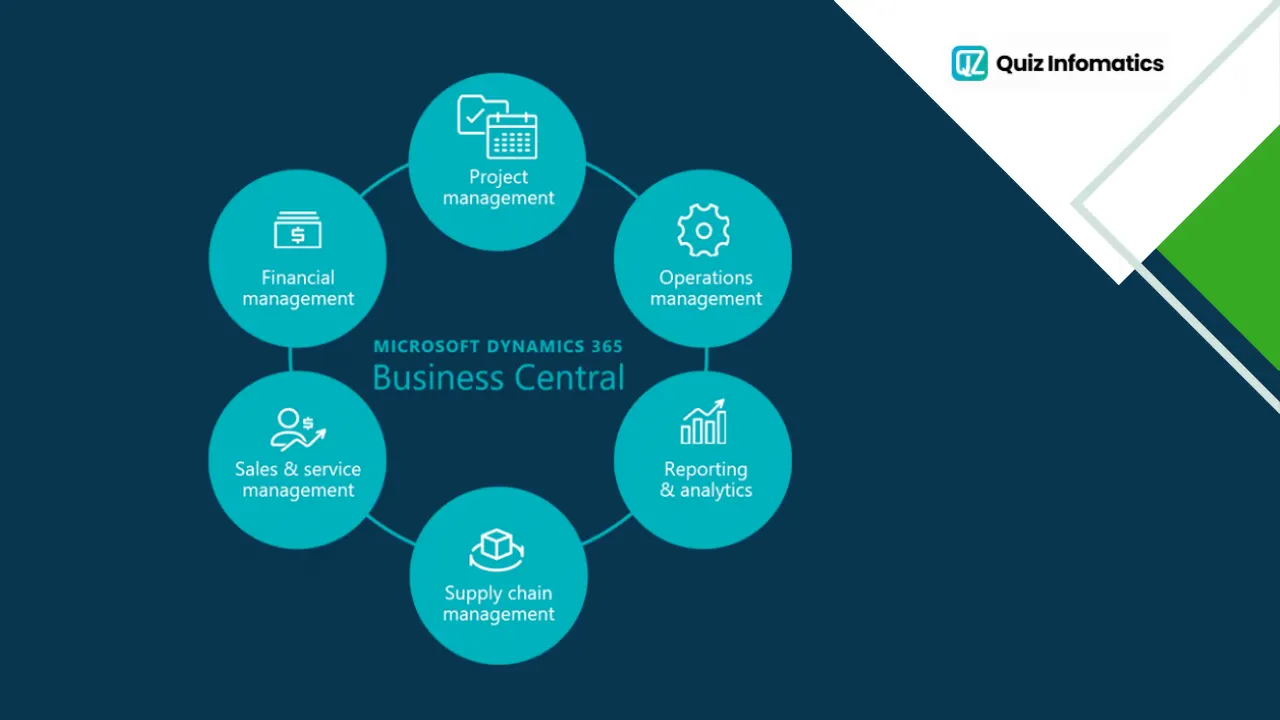
Business Central and the Dynamics 365 family
Business Central is the small-and-mid-market ERP within Microsoft Dynamics 365, which is a broader family of business applications covering both ERP and CRM. Understanding where it sits helps clarify what it is, and what it is not.
Microsoft Dynamics 365 is a modular set of cloud apps that share a common data layer and sit on Azure. For a full overview of the suite, see our beginner's guide to Microsoft Dynamics 365. Within that family, there are two distinct ERP tracks.
Business Central is the all-in-one ERP for small and mid-sized businesses, typically 10 to 300 users. Finance and Supply Chain Management (often called Finance and Operations, and formerly Dynamics AX) is the platform for larger enterprises with hundreds or thousands of users and highly complex, multi-entity operations.
Choosing correctly between these two tracks is one of the most important early decisions, and Business Central is the right answer for the large majority of SMEs. You can explore the full platform through our Microsoft Dynamics 365 solutions.
What are the main Business Central modules?
Business Central modules are the functional areas within the system that you use together on one database, covering finance, sales, purchasing, inventory, operations, and more. You activate what you need, and everything shares the same data.
Here are the core modules that most businesses rely on.
Financial management
The finance module is the heart of Business Central. It manages the general ledger, accounts payable and receivable, bank reconciliation, budgets, cash flow, and fixed assets, and it produces real-time financial reports.
For UAE businesses, this is also where VAT and corporate tax handling lives, making accurate, compliant reporting a natural by-product of daily operations.
Sales and customer management
The sales module handles quotes, orders, invoicing, and pricing, along with basic customer relationship management. It links customer history directly to operations, so a confirmed order flows straight into fulfilment and finance.
Purchasing and payables
This module manages purchase requisitions, supplier quotes, purchase orders, and vendor payments. It gives businesses control over spending and a clear, auditable purchasing trail.
Inventory management
The inventory module tracks stock levels, locations, and movements in real time. It automates reordering, reduces both stock-outs and overstocking, and keeps inventory data accurate across the business.
Supply chain and warehouse
Business Central coordinates the flow of goods from suppliers to customers, covering warehousing, item tracking, and demand planning. For trading and distribution businesses, this is often a core reason for adopting the system.
Project management
For services and project-based firms, this module tracks jobs, tasks, resources, timelines, and budgets, and ties project performance directly to the company's finances through job costing.
Manufacturing (Premium)
Available in the Premium licence, the manufacturing module handles production orders, bills of materials, and capacity planning. It suits SMEs that make or assemble products and need light-to-moderate manufacturing control.
Service management (Premium)
Also part of Premium, this module manages service orders, contracts, and after-sales support, linking them to customers and finance. It fits businesses that deliver ongoing service alongside products.
Reporting and analytics
Business Central includes built-in reporting and integrates tightly with Power BI for live dashboards and KPIs. Rather than exporting to spreadsheets, decision-makers get real-time visual insight into finance, sales, and operations.
Essentials vs Premium: which modules do you get?
The simplest way to understand the modules is through the two main licence tiers. Essentials covers core ERP, including finance, sales, purchasing, inventory, supply chain, and project management. Premium adds the manufacturing and service management modules on top.
Most SMEs start on Essentials and only move to Premium if they need manufacturing or service operations. The platform can also be extended with industry-specific apps from Microsoft's AppSource marketplace, so gaps can be filled without custom development.
How does Business Central work?
Business Central works as a cloud application on Microsoft Azure that connects your business data with the Microsoft tools your team already uses every day. Because it is cloud-based, staff access it through a browser or app from anywhere.
Three integrations make it especially powerful for SMEs:
Microsoft 365: Business Central links with Outlook, Excel, Word, Teams, and OneDrive, so people work inside familiar tools. You can process invoices from Outlook, analyse data in Excel, and collaborate in Teams.
Power Platform: Power BI dashboards, Power Automate workflows, and Power Apps let you report and automate without heavy custom coding.
Azure: the secure, scalable cloud infrastructure that keeps everything running and continuously updated, with two major feature releases each year.
Here is a simple example. A salesperson confirms an order in Business Central; inventory checks and reserves stock; a purchase order is raised automatically if stock is low; finance issues a compliant invoice; and a Power BI dashboard updates revenue in real time, all from a single entry with no re-keying.
What are the benefits of Business Central for SMEs?
The core benefit of Business Central is giving a growing business one connected system that already fits the Microsoft tools it uses, at a price and scale suited to SMEs. From there, the practical advantages stack up.
One connected system. No more disconnected accounting, inventory, and sales tools.
Familiar experience. Deep integration with Outlook, Excel, and Teams shortens the learning curve and improves adoption.
Right-sized for SMEs. It delivers real ERP capability without the cost and complexity of enterprise platforms.
Real-time insight. Built-in reporting and Power BI turn data into live dashboards for faster decisions.
Built-in compliance. Automated tax and financial reporting suit the UAE's VAT and corporate tax requirements.
Scalability. Start with the modules and users you need, and expand as you grow without re-platforming.
These benefits compound over time. A system adopted to fix accounting often ends up improving inventory, purchasing, and customer service as a natural result.
Let’s talk about your business
Start with a free 30-minute call. We’ll ask the right questions, listen carefully, and give you an honest view of what’s possible.
How much does Business Central cost?
Business Central uses a simple per-user, per-month subscription model, which is one reason it is popular with cost-conscious SMEs. Pricing is more transparent than most mid-market ERP platforms because Microsoft publishes its licence rates.
There are three main licence types. Essentials, at around 80 US dollars per user per month, covers core ERP. Premium, at around 110 US dollars per user per month, adds manufacturing and service management. Team Member licences, at around 8 US dollars per user per month, give light, mostly read-only access for staff who only need to view data or approve items.
One rule to note: all full users in a single Business Central tenant must be on the same tier, either all Essentials or all Premium, though you can supplement with Team Member licences. Beyond licensing, budget for implementation, data migration, and training. A common benchmark is that first-year total investment runs roughly three to five times the annual licence cost, with the balance being implementation and setup.
Business Central vs other ERP systems
Business Central competes mainly with Oracle NetSuite, Sage, Acumatica, and Odoo in the SME and mid-market space, and the right choice depends on your ecosystem, industry, and complexity. There is no universal best.
In broad terms, Business Central is the strongest fit for organisations already invested in Microsoft tools, because the integration with Microsoft 365, Teams, and Power BI delivers value that does not show up in a simple feature list. Oracle NetSuite is often favoured for complex multi-entity consolidation, while Odoo appeals to businesses wanting open-source flexibility and a low entry cost.
For a Microsoft-centric SME, Business Central usually wins on familiarity, integration, and predictable pricing. For deep multi-entity consolidation across many subsidiaries, larger organisations sometimes lean toward NetSuite or step up to Microsoft's own Finance and Operations track.
What Business Central is not: honest limitations
Being clear about what Business Central does not do is just as useful as listing its strengths, because the wrong fit is a common cause of ERP disappointment. It is a capable SME platform, not an enterprise mega-suite.
A few honest limitations are worth knowing:
Heavy multi-entity consolidation. Business Central handles multiple companies, but organisations with many legal entities needing automated intercompany eliminations often need third-party add-ons or a step up to Finance and Operations.
Very complex manufacturing. Premium covers light-to-moderate manufacturing well, but deep, high-volume discrete or process manufacturing may exceed its native scope.
Large user counts. It is sized for roughly 10 to 300 users. Organisations far beyond that usually belong on the enterprise track.
None of these are flaws for the audience Business Central is built for. They simply mark the point where a business has grown into different requirements, which is exactly why matching the platform to your needs matters.
AI in Business Central: Copilot and beyond
The newest chapter for Business Central is AI, delivered through Microsoft Copilot built into the application. Copilot can assist with finance, sales, and operations tasks, such as drafting documents, summarising data, explaining variances, and automating routine steps.
Recent release waves through 2025 and 2026 have added AI-driven automation, AI-powered financial analysis, a sustainability module, and deeper Power Platform integration. Microsoft continues to invest heavily here, with new capabilities arriving in its twice-yearly release waves.
For an SME making a multi-year investment, this matters. Choosing a platform with a credible, embedded AI roadmap helps future-proof the decision, and it is an area where Business Central is advancing quickly.
Why Business Central suits UAE SMEs
Business Central is well suited to UAE SMEs because it combines built-in compliance, cloud delivery, and integration with the Microsoft tools most local businesses already run. Each of these maps directly onto conditions in the UAE market.
Compliance is built in. With VAT and the corporate tax regime now part of doing business in the UAE, accurate and auditable records are essential. Business Central automates tax handling and reporting, and its structured finance data helps businesses prepare for the country's move to mandatory e-invoicing.
The market is cloud-first. UAE businesses are adopting cloud systems rapidly, supported by government digital-transformation initiatives. As a cloud-native platform on Azure, Business Central fits this direction naturally.
Microsoft is already everywhere. Many UAE companies already use Outlook, Excel, and Teams daily. Adding Business Central extends a familiar ecosystem rather than introducing a foreign one, which eases adoption for lean SME teams.
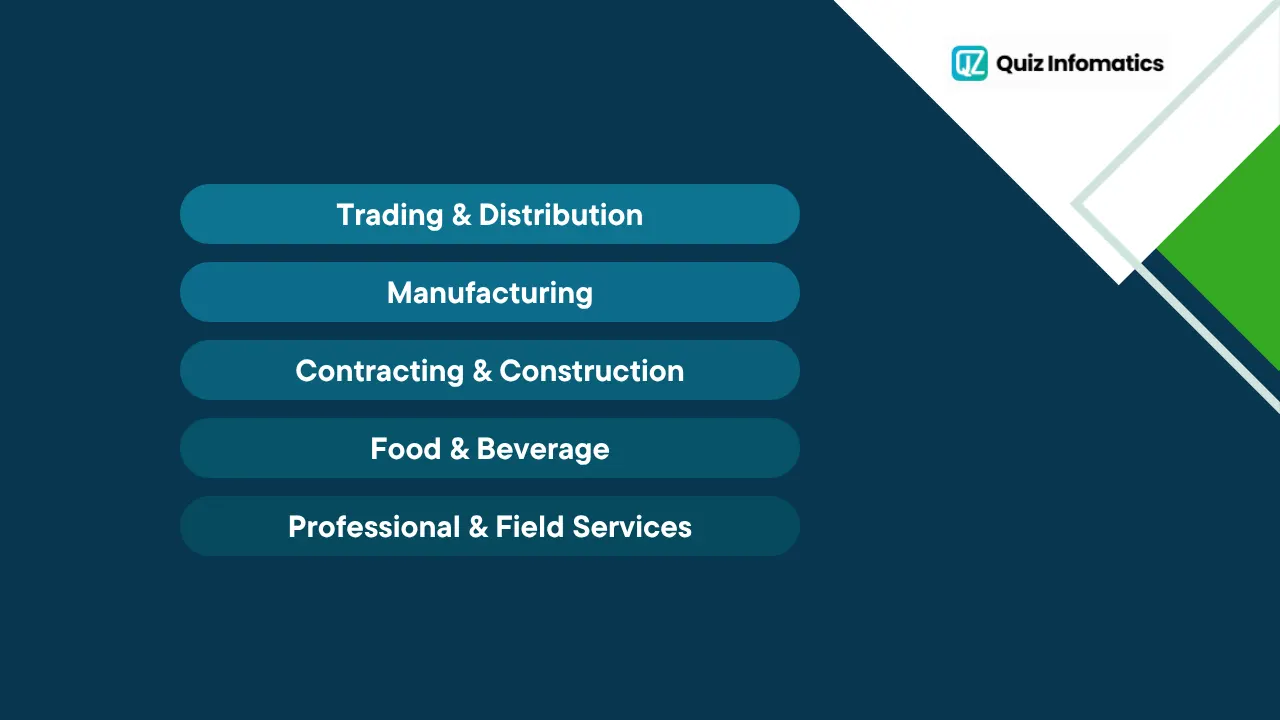
Which industries use Business Central in the UAE?
Business Central is industry-agnostic, but it is especially well suited to sectors that need to coordinate finance, inventory, and operations closely, several of which are central to the UAE economy. The platform can be tailored to each with configuration and add-on apps.
Common fits in the local market include:
Trading and distribution, where multi-warehouse inventory, order processing, and margins matter. Our trading industry solutions show how this works in practice.
Manufacturing, using the Premium tier for production orders, bills of materials, and capacity planning. See our manufacturing industry solutions for more.
Contracting and construction, where project costing and staged billing are essential.
Food and beverage, with traceability and inventory control across perishable stock.
Professional and field services, using project and service management to track jobs and contracts.
The common thread is complexity: once a business juggles multiple branches, product lines, or projects, disconnected tools start to break down, and a unified platform earns its place.
How is Business Central implemented?
Business Central implementation typically follows a phased path: discovery and planning, configuration, data migration, testing, training, go-live, and ongoing support. For SMEs, it is generally faster and cheaper to implement than enterprise ERP, but planning still matters.
The most common reasons projects disappoint are underestimating total cost of ownership, skipping the scoping phase, or choosing a partner on price alone. A phased rollout, usually starting with finance and inventory, then expanding, delivers value faster and carries less risk than switching everything at once.
Because a smooth deployment depends heavily on planning and expertise, working with an experienced partner early is a sound investment. Our ERP implementation services help UAE and GCC businesses configure Business Central, migrate their data cleanly, and train their teams for a confident go-live.
When should an SME adopt Business Central?
The best time to adopt Business Central is when your current tools start creating more work than they save, and delaying often costs more than acting. A few clear signals point to that moment:
You are rekeying the same data into multiple systems
Reports are out of date by the time they reach a decision-maker
Stock-outs or overstocking recur because inventory data is unreliable
Closing the books each month takes days rather than hours
Growth, such as a new branch or product line, is straining your spreadsheets
If several of these sound familiar, your business has likely outgrown entry-level tools. Our perspective on why SMEs should not delay ERP adoption explains the hidden cost of waiting too long.
How to decide if Business Central is right for you
Deciding on Business Central comes down to matching your processes, size, and ecosystem to what the platform does best, rather than choosing software first. Start by mapping your workflows and priorities, then test them against the system.
Key factors include whether you already use Microsoft tools, your business size and growth plans, your industry's specific needs, and your budget. Business Central is a strong default for Microsoft-centric SMEs, but every business is different, and the landscape is crowded.
Because the trade-offs are real, independent guidance helps. Our overview of choosing the right ERP and understanding the landscape of ERP systems walks through how to weigh these factors properly before you commit.
How do UAE businesses get started with Business Central?
Start with a structured discovery process: map your workflows, confirm which modules and licences you need, and build a phased rollout plan. This keeps risk low and proves value early.
From there, a certified partner configures the system, migrates your data, trains your team, and supports you through go-live and beyond. Because expert guidance dramatically improves success rates, engaging a partner early is worth it.
If you would like that support, our ERP consultants help UAE and GCC businesses plan, deploy, and get lasting value from Business Central. You can also review the full product details on the official Microsoft Dynamics 365 Business Central page.
Business Central in a nutshell
To recap the essentials:
Business Central is Microsoft's cloud ERP for small and mid-sized businesses, part of the Dynamics 365 family and built on Azure.
Its modules cover finance, sales, purchasing, inventory, supply chain, and projects in Essentials, with manufacturing and service management added in Premium.
It integrates natively with Microsoft 365, Power BI, and Azure, which makes adoption easier for the many UAE businesses already using Microsoft tools.
Pricing is a simple per-user subscription, making real ERP capability affordable for SMEs.
Success depends on planning, phased rollout, and expert guidance far more than on the software alone.
Business Central is not about buying software for its own sake. It is about giving a growing business one reliable, connected system that scales as it does, without the weight of an enterprise platform.
Frequently asked questions
What is Business Central used for? Business Central is used to run the core operations of a small or mid-sized business, including finance, sales, purchasing, inventory, and reporting, all in one connected cloud ERP system.
Is Business Central an ERP? Yes. Business Central is a full ERP system, designed specifically for small and mid-sized businesses rather than large enterprises.
What is the difference between Business Central and Dynamics 365? Dynamics 365 is Microsoft's broad family of ERP and CRM apps. Business Central is one app within that family, specifically the all-in-one ERP for small and mid-sized businesses.
Is Business Central the same as Dynamics NAV? Business Central is the modern, cloud-based successor to Dynamics NAV. It carries NAV's ERP heritage but is delivered as continuously updated cloud software.
What are the main Business Central modules? The core modules are financial management, sales, purchasing, inventory, supply chain, and project management in Essentials, with manufacturing and service management added in the Premium tier.
How much does Business Central cost? It uses a per-user, per-month subscription. Essentials is around 80 US dollars per user per month, Premium around 110, and Team Member licences around 8, with implementation and setup budgeted separately.
Is Business Central good for small businesses? Yes. It is purpose-built for small and mid-sized organisations, typically 10 to 300 users, offering real ERP capability without enterprise-level cost or complexity.
Is Business Central cloud or on-premise? Business Central is primarily a cloud solution running on Microsoft Azure, though on-premise deployment is also available. Most SMEs choose the cloud version for lower cost and easier maintenance.
How long does Business Central take to implement? For most SMEs, a focused Business Central rollout typically takes a few weeks to a few months, depending on scope, data quality, and how many modules go live at once. A phased approach starting with finance and inventory usually delivers value fastest.
Does Business Central work for businesses in the UAE? Yes. Business Central supports UAE VAT and corporate tax requirements, runs in the cloud, and integrates with the Microsoft tools most local businesses already use, making it a strong fit for UAE SMEs.
About the author
QZ Infomatics ERP Consulting Team - QZ Infomatics is a Dubai-based ERP and IT consultancy (Business Bay) that implements Microsoft Dynamics 365, Oracle NetSuite, SAP, and Odoo for businesses across the UAE and GCC. As a Microsoft partner, the team helps small and mid-sized businesses select, configure, and get lasting value from Business Central, across construction, manufacturing, trading and distribution, food and beverage, and facility management. This guide reflects hands-on experience deploying Microsoft's ERP for SMEs in the region.
Considering Business Central for your business? Talk to our ERP consultants.